WhatsApp




A complete guide for UK company directors and people with significant control (PSCs)
From 18 November 2025, identity verification became a legal requirement for company directors and people with significant control (PSCs) under the Economic Crime and Corporate Transparency Act 2023. Once you complete your identity verification, you receive a personal code – and knowing how to find, save, and use it correctly is essential to keeping your company compliant.
This guide explains everything you need to know about your Companies House personal code.
- What Is a Companies House Personal Code?
- Where to Find Your Personal Code
- How to Save Your Personal Code to a Companies House Account
- How to Use Your Personal Code
- The 12-Month Transition Period: What Are the Deadlines?
- What If Your Personal Details Do Not Match Companies House Records?
- What If You Think Your Personal Code Has Been Shared or Compromised?
- Frequently Asked Questions
- Summary: Key Steps at a Glance
What Is a Companies House Personal Code?
Your Companies House personal code is an 11-character alphanumeric code issued to you once you have successfully verified your identity. Here are the key things to understand about it:
- It is personal to you, not to any specific company you own or work for.
- You only need to verify your identity once – the same personal code is then used to link your verified identity to every company role you hold.
- If you are a director of multiple companies, you use the same personal code for all of them.
- You can share your personal code with trusted agents (for example, an accountant or formation agent) who file on your behalf.
Where to Find Your Personal Code
Where you find your code depends on how you verified your identity.
If You Verified Using GOV.UK One Login (Directly)
- Go to the Companies House sign-in page
- Sign in using the same email address you used when you verified your identity
- Navigate to “Manage account”
- Your personal code will be displayed there
Post Office verification note: If you completed your identity check at a Post Office using GOV.UK One Login, you will first receive an email from GOV.UK with the result of your identity check, usually within one working day. After that, your personal code will be visible in the “Manage account” section of your Companies House account.
If You Verified Through an Authorised Corporate Service Provider (ACSP)
When an ACSP (such as an accountant, solicitor, or company formation agent) verifies your identity, Companies House sends your personal code directly to the email address the ACSP provided on your behalf.
Steps to find your code in this case:
- Check the email inbox for the address your ACSP used when verifying you
- If you have not received an email, contact your ACSP and ask them which email address they registered for you
- If an incorrect email address was provided, the ACSP will need to contact Companies House to have it corrected
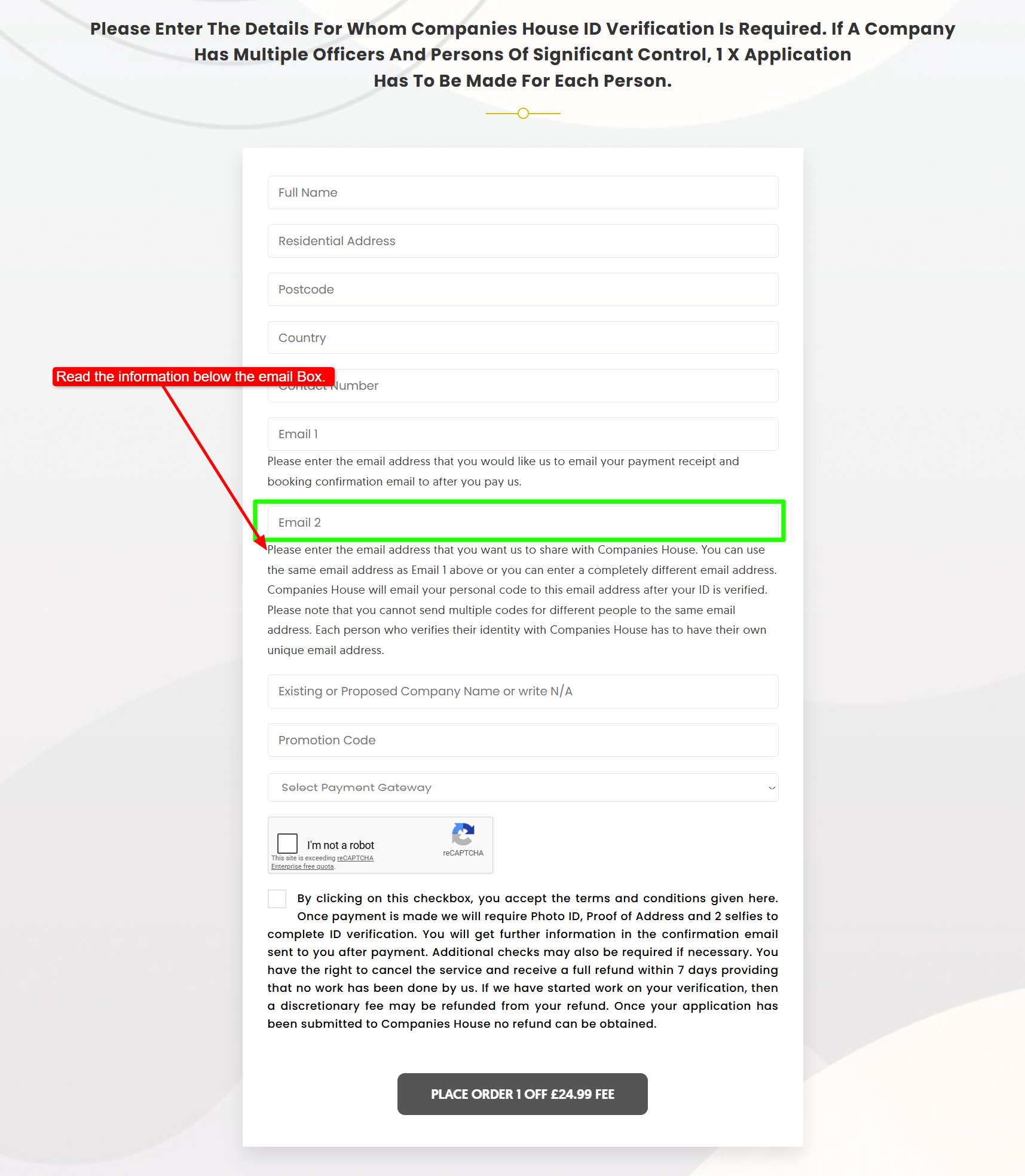
- At Icon Offices, we use the email address you provided during registration. Your code will be sent by Companies House to the email address entered in the field labelled: “Email for Companies House.” Please see the image below for reference.
Tip: Once you receive your code, it is strongly recommended that you save it to a Companies House account so you can access it at any time (see below).
How to Save Your Personal Code to a Companies House Account
If your identity was verified through an ACSP, your code is sent by email and is not automatically linked to an online account. To make sure you can always find it, save it to your Companies House account by following these steps:
- Go to the Companies House identity verification page
- Sign in – or create sign-in details – using the same email address that your personal code was sent to
- Confirm that you have already verified your identity
- Enter your personal code
- Enter your date of birth
Once saved, you can sign in to your Companies House account at any time and view your code in the “Manage account” tab.
How to Use Your Personal Code
You will need your personal code in different situations depending on your role.
If You Are a Director
- Existing directors (appointed before 18 November 2025): You must provide your personal code when your company files its next confirmation statement due after 18 November 2025.
- New directors (appointed from 18 November 2025 onwards): You must provide your personal code as part of your appointment filing or when incorporating a new company.
If You Are a Person with Significant Control (PSC)
PSCs have a 14-day window in which they must provide their personal code to Companies House. When that window begins depends on your situation:
| Your Situation | When Your 14-Day Window Starts |
|---|---|
| PSC before 18 November 2025 and also a director of the company | The day after your company’s confirmation statement date |
| PSC before 18 November 2025 and NOT a director | The first day of your birth month as recorded at Companies House |
| New PSC registered after 18 November 2025 | Companies House will write to you to confirm the start of your 14-day period |
If You File on Behalf of a Company
In future, individuals who file on behalf of a company may also need to confirm their verified identity using their personal code – unless they have verified via GOV.UK One Login, saved their code to their Companies House account, or are registered as (or added to) an ACSP account.
The 12-Month Transition Period: What Are the Deadlines?
| Date | What Happens |
|---|---|
| 8 April 2025 | Voluntary verification opens – directors and PSCs can start verifying early |
| 18 November 2025 | Mandatory identity verification begins – this is not a hard deadline for everyone, but the start of the transition period |
| 18 November 2026 | The hard deadline – all existing directors and PSCs must have verified their identity by this date |
The practical deadline for most existing directors is their company’s next confirmation statement due date after 18 November 2025. For example, if your confirmation statement is due in May 2026, you need to verify and have your code ready before then.
What If Your Personal Details Do Not Match Companies House Records?
If you try to link your personal code and receive an error saying your details do not match, this could be because:
- You have entered your personal code incorrectly – double-check it
- Your Name, Date of Birth or Residency on Companies House records is incorrect or does not match with your verification documents
- An ACSP verified your identity and submitted incorrect details for you
What If You Think Your Personal Code Has Been Shared or Compromised?
Your personal code should be kept safe. While you can share it with trusted agents who file on your behalf, you should take action immediately if you believe it has been shared or accessed without your permission.
What to do:
- Contact Companies House directly to request a new code
- Companies House will cancel your previous code and send a new one to your email address
- You can reach Companies House via the official contact page
Frequently Asked Questions
Do I need a separate personal code for each company I am a director of? No. You verify your identity once and receive a single personal code. You then use that same code to confirm your verified identity for every company you are a director or PSC of.
Can I share my personal code with my accountant? Yes. You are permitted to share your personal code with trusted agents, such as accountants or solicitors, who file on your behalf.
What happens if I do not provide my personal code? Your company may be unable to file its confirmation statement or make other filings. Continued failure to comply can result in financial penalties, filing restrictions, and in serious cases, potential disqualification as a director or the company being struck off the register.
I verified through an ACSP but did not receive an email. What should I do? Contact your ACSP and ask them to confirm which email address they registered for you. If it was incorrect, they will need to contact Companies House to have it corrected.
Where is the official guidance? The full official GOV.UK guidance on personal codes is available at: https://www.gov.uk/guidance/companies-house-personal-codes-for-identity-verification
Summary: Key Steps at a Glance
- Verify your identity – via GOV.UK One Login directly, at a Post Office, or through an ACSP
- Find your personal code – in your Companies House “Manage account” tab (if you used GOV.UK One Login) or in the email sent by Companies House (if you used an ACSP)
- Save your code – if you verified through an ACSP, save your code to a Companies House account for easy future access
- Use your code – provide it in your confirmation statement (existing directors), at appointment (new directors), or within your 14-day window (PSCs)
- Keep it safe – share only with trusted agents, and contact Companies House immediately if you think it has been compromised
This guide is based on official GOV.UK guidance last updated February 2026. For the most current information, always refer to Companies House official guidance.